I’ve been using Glance as my homelab dashboard for a while now. One of the things that makes Glance great is its widget system — both first-party and community-built — which is essentially plain HTML with Go templating that you can customize to your heart’s content. With that flexibility in mind, I built a few custom widgets of my own for Portainer, OctoPrint, Sonarr, and Radarr.
Portainer Widget
Glance already has a community Portainer widget, but it was missing a few features I wanted for my setup. I tweaked the layout to show container health status at a glance — running, healthy, stopped, and unhealthy counts all visible in one row. I didn’t submit this to the community widget repo since the changes are fairly minor.

- type: custom-api
    title: Portainer
    cache: 1h
    options:
    base-url: ${PORTAINER_URL}
    api-key: ${PORTAINER_API_KEY}
    endpoint-id: "2"
    template: |
    {{ $baseURL := .Options.StringOr "base-url" "" }}
    {{ $apiKey := .Options.StringOr "api-key" "" }}
    {{ $endpointID := .Options.StringOr "endpoint-id" "1" }}
    {{ $requestURL := print $baseURL "/api/endpoints/" $endpointID }}

    {{ if or (eq $baseURL "") (eq $apiKey "") }}
        <p class="color-negative">Portainer URL or API Key not configured.</p>
    {{ else }}
        {{ $response := newRequest $requestURL
            | withHeader "X-API-Key" $apiKey
            | getResponse }}

        {{ if ne $response.Response.StatusCode 200 }}
        <p class="color-negative">Error: {{ $response.Response.Status }}</p>
        {{ else }}
        {{ $data := $response.JSON }}
        <div style="display: flex; align-items: center; gap: 20px;">
            <!-- Left column: Logo + Name + Summary -->
            <div style="display: flex; align-items: center; gap: 12px; flex-shrink: 0;">
            <div style="width: 40px; height: 40px; display: flex; justify-content: center; align-items: center;">
                <img src="https://cdn.jsdelivr.net/gh/homarr-labs/dashboard-icons/svg/portainer-dark.svg" width="28" height="28" style="object-fit: contain;">
            </div>
            <div>
                <div class="size-h4 color-highlight" style="display: flex; align-items: center; gap: 6px;">
                {{ $data.String "Name" }}
                <span style="width: 8px; height: 8px; border-radius: 50%; background-color: var(--color-positive);"></span>
                </div>
                <div class="size-h5 color-subdue" style="display: flex; gap: 10px;">
                <span data-popover-type="text" data-popover-text="Containers">{{ $data.Int "Snapshots.0.ContainerCount" }} containers</span>
                <span data-popover-type="text" data-popover-text="Volumes">{{ $data.Int "Snapshots.0.VolumeCount" }} volumes</span>
                </div>
            </div>
            </div>
            <!-- Right column: Stats in a row -->
            <div style="display: flex; gap: 20px; margin-left: auto;">
            <div style="text-align: center;">
                <div class="size-h3 color-positive">{{ $data.Int "Snapshots.0.RunningContainerCount" }}</div>
                <div class="size-h6 color-subdue">Running</div>
            </div>
            <div style="text-align: center;">
                <div class="size-h3 color-highlight">{{ $data.Int "Snapshots.0.HealthyContainerCount" }}</div>
                <div class="size-h6 color-subdue">Healthy</div>
            </div>
            <div style="text-align: center;">
                <div class="size-h3 color-highlight">{{ $data.Int "Snapshots.0.StoppedContainerCount" }}</div>
                <div class="size-h6 color-subdue">Stopped</div>
            </div>
            <div style="text-align: center;">
                <div class="size-h3 color-negative">{{ $data.Int "Snapshots.0.UnhealthyContainerCount" }}</div>
                <div class="size-h6 color-subdue">Unhealthy</div>
            </div>
            </div>
        </div>
        {{ end }}
{{ end }}# Set the following in glance .env
${PORTAINER_URL}
${PORTAINER_API_KEY}OctoPrint Widget

I couldn’t find an existing Glance widget for OctoPrint, so I built one from scratch. It displays the printer’s connection status, nozzle and bed temperatures, and a live progress bar with time remaining when a print is active.
- type: custom-api
    title: OctoPrint
    cache: 1m
    options:
    base-url: ${OCTOPRINT_URL}
    api-key: ${OCTOPRINT_API_KEY}
    template: |
    {{ $baseURL := .Options.StringOr "base-url" "" }}
    {{ $apiKey := .Options.StringOr "api-key" "" }}

    {{ if or (eq $baseURL "") (eq $apiKey "") }}
        <p class="color-negative">OctoPrint URL or API Key not configured.</p>
    {{ else }}
        {{ $printerResponse := newRequest (print $baseURL "/api/printer")
            | withHeader "X-Api-Key" $apiKey
            | getResponse }}
        {{ $jobResponse := newRequest (print $baseURL "/api/job")
            | withHeader "X-Api-Key" $apiKey
            | getResponse }}
        {{ $connectionResponse := newRequest (print $baseURL "/api/connection")
            | withHeader "X-Api-Key" $apiKey
            | getResponse }}

        {{ if ne $printerResponse.Response.StatusCode 200 }}
        <div style="display: flex; align-items: center; gap: 10px;">
            <span class="size-h4 color-highlight">Printer</span>
            <span style="width: 8px; height: 8px; border-radius: 50%; background-color: var(--color-negative);"></span>
            <span class="color-negative">Offline</span>
        </div>
        {{ else }}
        {{ $printer := $printerResponse.JSON }}
        {{ $job := $jobResponse.JSON }}
        {{ $connection := $connectionResponse.JSON }}

        {{ $state := $printer.String "state.text" }}
        {{ $isPrinting := $printer.Bool "state.flags.printing" }}
        {{ $isPaused := $printer.Bool "state.flags.paused" }}
        {{ $isError := $printer.Bool "state.flags.error" }}
        {{ $isOperational := $printer.Bool "state.flags.operational" }}

        {{ $nozzleActual := $printer.Float "temperature.tool0.actual" }}
        {{ $nozzleTarget := $printer.Float "temperature.tool0.target" }}
        {{ $bedActual := $printer.Float "temperature.bed.actual" }}
        {{ $bedTarget := $printer.Float "temperature.bed.target" }}

        {{ $printerName := $connection.String "options.printerProfiles.0.name" }}

        <!-- Header: Printer name + status -->
        <div style="display: flex; align-items: center; gap: 10px; margin-bottom: 10px;">
            <div style="width: 32px; height: 32px; display: flex; align-items: center; justify-content: center;">
            <svg xmlns="http://www.w3.org/2000/svg" viewBox="0 0 24 24" fill="none" stroke="currentColor" stroke-width="1.5" style="width: 24px; height: 24px;">
                <path stroke-linecap="round" stroke-linejoin="round" d="M6.72 13.829c-.24.03-.48.062-.72.096m.72-.096a42.415 42.415 0 0 1 10.56 0m-10.56 0L6.34 18m10.94-4.171c.24.03.48.062.72.096m-.72-.096L17.66 18m0 0 .229 2.523a1.125 1.125 0 0 1-1.12 1.227H7.231c-.662 0-1.18-.568-1.12-1.227L6.34 18m11.318 0h1.091A2.25 2.25 0 0 0 21 15.75V9.456c0-1.081-.768-2.015-1.837-2.175a48.055 48.055 0 0 0-1.913-.247M6.34 18H5.25A2.25 2.25 0 0 1 3 15.75V9.456c0-1.081.768-2.015 1.837-2.175a48.041 48.041 0 0 1 1.913-.247m10.5 0a48.536 48.536 0 0 0-10.5 0m10.5 0V3.375c0-.621-.504-1.125-1.125-1.125h-8.25c-.621 0-1.125.504-1.125 1.125v3.659M18 10.5h.008v.008H18V10.5Zm-3 0h.008v.008H15V10.5Z" />
            </svg>
            </div>
            <div style="flex-grow: 1;">
            <div class="size-h4 color-highlight" style="display: flex; align-items: center; gap: 6px;">
                {{ if ne $printerName "" }}{{ $printerName }}{{ else }}OctoPrint{{ end }}
                <span style="width: 8px; height: 8px; border-radius: 50%; background-color: var(--color-{{ if $isError }}negative{{ else if $isPrinting }}primary{{ else if $isPaused }}warning{{ else if $isOperational }}positive{{ else }}negative{{ end }});"></span>
            </div>
            <div class="size-h5 color-subdue">{{ $state }}</div>
            </div>
        </div>

        <!-- Temperatures -->
        <div style="display: flex; gap: 20px; margin-bottom: 10px;">
            <div style="flex: 1;">
            <div class="size-h6 color-subdue">Nozzle</div>
            <div class="size-h4 color-highlight">
                {{ printf "%.1f" $nozzleActual }}°
                {{ if gt $nozzleTarget 0.0 }}<span class="color-subdue size-h5">/ {{ printf "%.0f" $nozzleTarget }}°</span>{{ end }}
            </div>
            </div>
            <div style="flex: 1;">
            <div class="size-h6 color-subdue">Bed</div>
            <div class="size-h4 color-highlight">
                {{ printf "%.1f" $bedActual }}°
                {{ if gt $bedTarget 0.0 }}<span class="color-subdue size-h5">/ {{ printf "%.0f" $bedTarget }}°</span>{{ end }}
            </div>
            </div>
        </div>

        <!-- Print progress (only when printing) -->
        {{ if $isPrinting }}
            {{ $fileName := $job.String "job.file.name" }}
            {{ $completion := $job.Float "progress.completion" }}
            {{ $printTimeLeft := $job.Int "progress.printTimeLeft" }}

            <div style="margin-top: 10px; padding-top: 10px; border-top: 1px solid var(--color-text-subdue);">
            <div class="size-h5 color-subdue text-truncate" style="margin-bottom: 5px;">{{ $fileName }}</div>
            <div style="display: flex; align-items: center; gap: 10px;">
                <div class="progress-bar" style="flex-grow: 1;">
                <div class="progress-value" style="--percent: {{ printf "%.0f" $completion }}"></div>
                </div>
                <div class="size-h5 color-highlight">{{ printf "%.1f" $completion }}%</div>
            </div>
            {{ if gt $printTimeLeft 0 }}
                <div class="size-h6 color-subdue" style="margin-top: 5px;">
                {{ $hours := div $printTimeLeft 3600 }}
                {{ $minutes := div (mod $printTimeLeft 3600) 60 }}
                {{ if gt $hours 0 }}{{ $hours }}h {{ end }}{{ $minutes }}m remaining
                </div>
            {{ end }}
            </div>
        {{ end }}
        {{ end }}
{{ end }}# Set the following on glance .env
${OCTOPRINT_URL}
${OCTOPRINT_API_KEY}Sonarr and Radarr Widgets
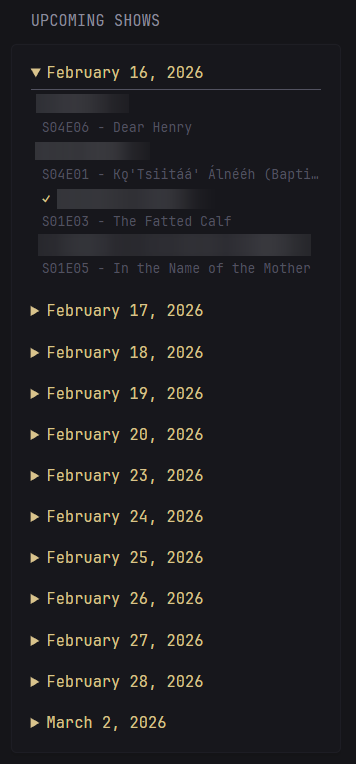
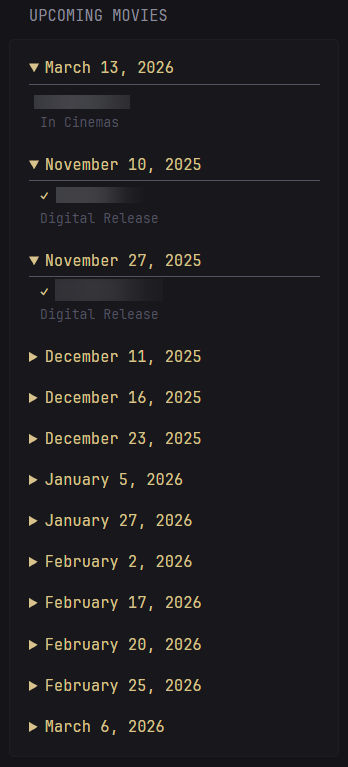
There are a few community-made Glance widgets for Sonarr and Radarr, but they pull media thumbnails in a way that requires setting up a proxy — something I wanted to avoid. Instead, I built a simpler, text-based version. Upcoming episodes and movies are grouped by date in collapsible sections, and anything that has already been downloaded gets a checkmark.
Sonarr Widget Code
- type: custom-api
title: Upcoming Shows
title-url: ${SONARR_URL}
cache: 30m
options:
interval: 15
api-base-url: ${SONARR_API_URL}
key: ${SONARR_KEY}
url: ${SONARR_URL}
template: |
{{ $intervalH := .Options.IntOr "interval" 7 | mul 24 }}
{{ $startOfDay := printf "%sT00:00:00" (now | formatTime "2006-01-02") }}
{{ $posInterval := (offsetNow (printf "+%dh" $intervalH)) | formatTime "2006-01-02T15:04:05" }}
{{ $apiBaseUrl := .Options.StringOr "api-base-url" "" }}
{{ $key := .Options.StringOr "key" "" }}
{{ $url := .Options.StringOr "url" $apiBaseUrl }}
{{ if or (eq $apiBaseUrl "") (eq $key "") }}
<p class="color-negative">API URL or Key not configured.</p>
{{ else }}
{{ $requestUrl := printf "%s/api/v3/calendar?includeSeries=true&start=%s&end=%s" $apiBaseUrl $startOfDay $posInterval }}
{{ $data := newRequest $requestUrl
| withHeader "Accept" "application/json"
| withHeader "X-Api-Key" $key
| getResponse }}
{{ $episodes := $data.JSON.Array "" | sortByTime "airDateUtc" "rfc3339" "asc" }}
{{ $currentDate := "" }}
{{ $hasItems := false }}
{{ if eq (len $episodes) 0 }}
<p>No upcoming shows.</p>
{{ else }}
<div class="flex flex-column gap-15">
{{ range $idx, $haserPet := $episodes }}
{{ $hasItems = true }}
{{ $airDate := .String "airDateUtc" | parseTime "RFC3339" }}
{{ $airDate = $airDate.In now.Location }}
{{ $dateStr := $airDate.Format "January 2, 2006" }}
{{ $showName := .String "series.title" }}
{{ $episodeTitle := .String "title" }}
{{ $season := .Int "seasonNumber" }}
{{ $episode := .Int "episodeNumber" }}
{{ $seString := printf "S%02dE%02d" $season $episode }}
{{ if ne $dateStr $currentDate }}
{{ $currentDate = $dateStr }}
</details>
{{ if eq $idx 0 }}
<details open>
{{ else }}
<details>
{{ end }}
<summary class="color-primary size-h4" style="cursor:pointer;">
{{ $dateStr }}
</summary>
<div class="margin-top-3" style="padding-left: 10px; border-top: 1px solid var(--color-text-subdue)">
{{ end }}
<div class="margin-top-3 margin-bottom-3">
<div class="color-highlight text-truncate">
{{ if .Bool "hasFile" }}<span class="color-positive">✓</span> {{ end }}{{ $showName }}
</div>
<div class="size-h5 color-subdue text-truncate">{{ $seString }} - {{ $episodeTitle }}</div>
</div>
{{ end }}
</details>
</div>
{{ end }}
{{ end }}# Set the following in glance .env
${SONARR_URL}
${SONARR_API_URL}
${SONARR_KEY}Radarr Widget Code
- type: custom-api
title: Upcoming Movies
title-url: ${RADARR_URL}
cache: 30m
options:
interval: 30
api-base-url: ${RADARR_API_URL}
key: ${RADARR_KEY}
url: ${RADARR_URL}
template: |
{{ $intervalH := .Options.IntOr "interval" 30 | mul 24 }}
{{ $now := now | formatTime "2006-01-02T15:04:05" }}
{{ $posInterval := (offsetNow (printf "+%dh" $intervalH)) | formatTime "2006-01-02T15:04:05" }}
{{ $apiBaseUrl := .Options.StringOr "api-base-url" "" }}
{{ $key := .Options.StringOr "key" "" }}
{{ $url := .Options.StringOr "url" $apiBaseUrl }}
{{ if or (eq $apiBaseUrl "") (eq $key "") }}
<p class="color-negative">API URL or Key not configured</p>
{{ else }}
{{ $requestUrl := printf "%s/api/v3/calendar?start=%s&end=%s" $apiBaseUrl $now $posInterval }}
{{ $data := newRequest $requestUrl
| withHeader "Accept" "application/json"
| withHeader "X-Api-Key" $key
| getResponse }}
{{ $movies := $data.JSON.Array "" | sortByTime "digitalRelease" "rfc3339" "asc" }}
{{ $currentDate := "" }}
{{ $hasItems := false }}
{{ if eq (len $movies) 0 }}
<p>No upcoming movies.</p>
{{ else }}
<div class="flex flex-column gap-15">
{{ range $idx, $movie := $movies }}
{{ $hasItems = true }}
{{ $movieTitle := .String "title" }}
{{ $status := .String "status" }}
{{ $digitalRelease := .String "digitalRelease" }}
{{ $physicalRelease := .String "physicalRelease" }}
{{ $inCinemas := .String "inCinemas" }}
{{ $releaseType := "Upcoming" }}
{{ $releaseDate := "" }}
{{ if ne $digitalRelease "" }}
{{ $releaseDate = $digitalRelease }}
{{ $releaseType = "Digital Release" }}
{{ else if ne $physicalRelease "" }}
{{ $releaseDate = $physicalRelease }}
{{ $releaseType = "Physical Release" }}
{{ else if ne $inCinemas "" }}
{{ $releaseDate = $inCinemas }}
{{ $releaseType = "In Cinemas" }}
{{ end }}
{{ if ne $releaseDate "" }}
{{ $parsedDate := $releaseDate | parseTime "RFC3339" }}
{{ $parsedDate = $parsedDate.In now.Location }}
{{ $dateStr := $parsedDate.Format "January 2, 2006" }}
{{ if ne $dateStr $currentDate }}
{{ $currentDate = $dateStr }}
</details>
{{ if eq $idx 0 }}
<details open>
{{ else }}
<details>
{{ end }}
<summary class="color-primary size-h4" style="cursor:pointer;">
{{ $dateStr }}
</summary>
<div class="margin-top-3" style="padding-left: 10px; border-top: 1px solid var(--color-text-subdue)">
{{ end }}
<div class="margin-top-3 margin-bottom-3">
<div class="color-highlight text-truncate">
{{ if .Bool "hasFile" }}<span class="color-positive">✓</span> {{ end }}{{ $movieTitle }}
</div>
<div class="size-h5 color-subdue">{{ $releaseType }}</div>
</div>
{{ end }}
{{ end }}
</details>
</div>
{{ end }}
{{ end }}# Set the following in glance .env
${RADARR_URL}
${RADARR_API_URL}
${RADARR_KEY}Wrapping Up
These widgets have been working well on my dashboard for a while now. Glance’s custom widget system makes it straightforward to pull data from any API and display it however you want — no extra dependencies or proxies needed. If you end up using or adapting any of these for your own setup, feel free to reach out. I’d love to see what you come up with.